Sunday, October 23, 2005

Guess what just turned 34?


Googler insights into product and technology news and our culture.
Guess what just turned 34?

10/21/2005 03:19:00 PM
Posted by Paul Buchheit, Gmail Engineer

It's difficult to pin down the exact origin of email, but in October 1971, an engineer named Ray Tomlinson chose the '@' symbol for email addresses and wrote software to send the first network email.

At the time, it must not have seemed very important – nobody bothered to save that first message or even record the exact date. I've always thought that it would be fun to witness a little bit of history like that – to be there when something important happened. That's part of what drove me to join a little no-name startup named Google, and it's why I was excited when I was given a chance to create a new email product, now called Gmail.
Read on and when you get to the end you will find an invite to join the Gmail fun and Games (Well Fun Anyway)
Tony

Saturday, October 22, 2005

NeoDownloader Lite (freeware)


Download thousands of pictures with a few mouse clicks!

NeoDownloader Lite will allow you to download and view thousands of pictures from web sites. With NeoDownloader Lite browsing the Web for pictures is made simple and easy - you drag the URL of a page, drop it on the Drop Basket and this smart utility explores it and downloads all images to your hard drive. You can immediately see everything you download and delete unwanted pictures. You can also set the program to explore the entire web site and retrieve only those images that you want. NeoDownloader provides a number of features to make image retrieval simple and easy, they include image filtering, image preview, a built-in image viewer and the option to set selected picture as Windows wallpaper.

Wednesday, October 19, 2005

Meet the Flocksters

There's a new browser on the block that you ought to know about. It's called Flock, and you can find it here:
http://www.flock.com/home/

Well, almost: Flock hasn't been released yet, and I haven't tried it. But BusinessWeek has a lot to say about the upcoming release:
http://find.pcworld.com/49966

According to the Flocksters, Flock is "the social browser, open source, cross platform and based on Mozilla technologies." They have more to say in their blog:
http://feeds.flock.com/

I just came across this review about Flock.Its well worth the read

Buick Fantasy Golf.


Fore!
Welcome to Buick Fantasy Golf. This free game gives you the chance to guide a group of professional golfers from the early season events of the winter right through to The Tour Championship in November.
All you need to tee off is a free Yahoo! ID, so get yours now and get on the course.

OR Why not try
Fantasy Auto Racing.

Or for that matter go to the main site for more fantasy games

Tuesday, October 18, 2005

Google Reader


Google finally moved into the RSS reader market,
# Spend your time reading what you care about most
Reader automatically gets the latest news and updates for your favorite sites. You can sort your reading list by relevance, which will guess what's most relevant to you based on how you use Google Reader (such as which items you decide to actually read).
# Find the blogs and news sites you've been missing out on
The amount of information on the web is rapidly increasing. Use Reader to discover new content you don't want to miss.
# Share interesting items with friends
When you come across something worth sharing, quickly email or blog it from within Reader. Star or labels items you want to save for yourself.

Reply By Voice To Your Outlook E-mails: WaxMail


With WaxMail, you can start replying to your Outlook e-mails via your own voice. At no additional cost.

WaxMail adds a super-simple mini-toolbar to your Windows Outlook which enables you to record, with a one-click operation, a voice-based reply to any e-mail.

The recorded message is immediately embedded in your reply as an .MP3 file and sent out along with it with maximum simplicity.

As an example and intro to this new cool tool, here is the WaxMail voice mail attachment from Jeremy Hague in Australia.

Listen to the audio

Mercury Audio Player v1.21


Mercury Audio Player
Version 1.21
Mercury Audio Player is a powerful media player for the Windows operating system. Mercury will run on Windows 98 or later, and weighs in at the small size of 1935 KB for the MSI installation download.

* Features Fully Shoutcast Compatible Streaming Audio
* Universal ID3v1 Tag Support - All media supported by Mercury can use ID3v1 Tags. This does not affect compatibility with other programs.
* ID3v1 Tag Editor
* Video Playback
* CD Audio Support
* Fullscreen Video Mode
* Freeform Skin Support
* No Skin mode (Uses no Skin Resources)
* Auto Media Resume upon Launch
* Fully Customizable Hot Key/Background key support
* Auto Playback (Alarm Clock mode)
* A->B Looping
* 3 Way Repeat
* Integrated Playlist Editor
* Integrated search mode for Playlist Editor
* Support for almost all major audio and video formats.
* Upto 96KHz Frequency Rate (Dependent on soundcard)

* System Requirements Windows 98 or newer operating system
* DirectX 8 or newer (Get the newest version here)
* Pentium-class CPU or Equivilent
* 16 MB of RAM
* 500 KB of Hard Disk Space (Player only)

So you think you're ready to try this awesome piece of software? Download options include a Windows Installer (.msi) for fast downloads and a WISE Installer (.exe) as a backup in case the .msi cannot be run on your system.

Please uninstall previous versions of Mercury Audio Player before installing version 1.21

PiXPO

>
Share photos, videos and songs quickly and easily with PiXPO. PiXPO’s secure P2P sharing technology makes sharing super fast! It is private and secure, allowing you to control who can see your albums. PiXPO allows you to create albums, invite friends, stream video, and chat. PiXPO has received numerous awards and many rave reviews. E-mail attachments and online hosting are a thing of the past. With PiXPO, sharing has never been easier!

Download Now!

License: Freeware
Price: Free
OS: Windows2000,WinXP
File Size: 6.05 MB
Company: PiXPO

VLC media player


Here's Looking at the Right Codec

If you've ever downloaded a video file that just plain wouldn't play, you're probably either using the wrong player or missing a video codec. You can hunt down these codecs and install them--but let's be frank, that's kind of a pain. Open-source media player VLC sidesteps these problems by building in most video codecs. It supports most audio formats, too.

VLC--which open-source aficionados might remember by its former name, VideoLan Client--played almost every video with which I tested it. It makes no claim to play Real files; for that, you need either Real Networks' player or the third-party Real Alternative:
http://www.pcworld.com/downloads/file_description/0,fid,23205,tk,srx,00.asp

VLC also choked on a WMA file with digital rights management built-in. Everything else displayed well, even the mystery files that sat on my desktop for months because I couldn't be bothered to find and install the right codecs.

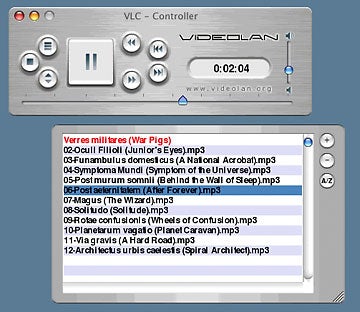
No slouch as a music player, VLC played every odd file I could unearth. The blessedly basic control panel is a mere sliver that doesn't automatically default to visualizations, advertisements, and the other useless screen-munching items that are all too common. I particularly liked one of the included skins, not so much for its Mac-like brushed-aluminum look, but because the playlist and controls could detach from one another--a nifty feature that few players support.

VLC is free of charge. If you like the program, feel free to toss a few dollars to the good folks at VideoLan.org.

You can check out a screen shot here:
http://images.pcworld.com/reviews/graphics/122737-vlcDLthis_b.jpg

http://www.pcworld.com/downloads/file_description/0,fid,26092,tk,srx,00.asp

Meebo


How many instant messaging clients do you have installed on your computer? With so many different protocols and services in existence, it’s hard for people to use only one application when they need to get their IM fix. There are some great all-in-one options out there, but from my experience, the majority of users still have at least three clients installed on their systems. If your friends are scattered all over a bunch of different services, then you’re required to support what they use. Instead of firing up a bunch of programs to talk to people when you’re at home or on the road, just use Meebo.

This service really surprised and impressed me. It allows you to use a single Web site to talk to all of your buddies. Meebo supports the major IM applications, and logging in is as easy as ever. My contact list was imported perfectly, and conversations worked nicely. The site is in the alpha stage, but even with the quirks (and trust me, there are some), it just feels good to use. Their privacy information needs a little help, but they're on the right track. It's nice to be able to open up your Web browser and have all of your messaging needs right at your fingertips.

Instant messaging software? What's that?

Monday, October 17, 2005

Butterfly Station


Educational sites will always be a favorite genre for me.

However, sometimes you just need to shut the old brain off and relax.

Butterfly Station will allow you to do just that.

It’s just a little lightweight fun. Kind of a pleasant waste of time, if you will. It’s PERFECT for stressful days at the salt mines, when you need a quick vacation from work.

If you grew up in the '60s or '70s, you'll love CyberSpirograph. Take your virtual pen and move it to the desired virtual hole in the wheel, and start drawing! You can adjust all sorts of angles, speeds, etc. to make an infinite number of patterns. You can even change the color of your "pen" on the fly.

PhotoFiltre v6.1.5


What is PhotoFiltre? It is just about the best freeware image editing and creating program out there today. PhotoFiltre is the total package when it comes to a free image editing program. It allows you to do simple or advanced adjustments to an image and apply a vast range of filters on it. It is simple and intuitive to use, and has an easy learning curve. If you have used any other image editing software before, you should have no problems with PhotoFiltre. The Web site for PhotoFiltre also has lots of great resources. You can get both plugins and tutorials via its Web site. PhotoFiltre is free for a private, non-commercial, or educational use (including non-profit organizations). In this case, registration is not necessary. But commercial or professional use requires a registration. So are some of the other photo editing software deals out there too expensive for your taste? Then try out PhotoFiltre!

Friday, September 30, 2005

ObjectDock v1.2


Don't begrudge Mac users their pretty little shortcut dock. With ObjectDock, you can mimic their dock or make one that's uniquely yours. ObjectDock lets you place shortcuts, running tasks, and more in a dock of your choosing. The icons expand when you mouse-over them, making it easy to store a great deal of information in a small place and still find what you're looking for. ObjectDock is skinnable, and you can customize it appearance in several ways.

Explorerxp


ExplorerXP is a very fast, small, compact and innovative FREEWARE (for non - commercial use) file manager for Windows 2000/XP. Unlike the regular Windows Explorer, it displays the total size of each folder and allows you to browse multiple folders from a tabbed interface.
Tabbed interface - all your windows (open folders) will appear inside a single ExplorerXP application. The tab bar provides a quick access to all open windows

EverNote


With EverNote 1.0 you can easily store and quickly access typed and handwritten memos, webpage excerpts, emails, phone messages, addresses, passwords, brainstorms, sketches, documents and more!

Free

Advanced Diary


Overview:

Do you need a simple and free private digital diary for your daily records? Advanced Diary is the perfect choice. First, it supports multiple diaries and multiple entries for a single day. This is a unique feature, because no other diary software is capable of keeping multiple diaries in a single database file. Second, Advanced Diary is clearly structured and easily searched. Interlinking one entry to another is possible as well. Third, there are two available modes - Calendar (show by date) and Document Tree (show by file). The Calendar mode, as the name implies, shows a calendar. A user can access diary entries by simply jumping to a certain date. The Document Tree mode displays a so-called "file tree" so a person can open a desired file immediately. Since both modes are useful in their own unique ways, it's smart to switch between them, depending on the situation

Read Print


A warm welcome to Read Print, your free online library. Our website offers thousands of free books for students, teachers, and the classic enthusiast. To find the book you desire to read, start by looking through the author index.

Fatfingers


No matter how well you type, you’re going to make typos from time to time. In most situations, you can catch your mistakes before you publish them, but if you don’t thoroughly check your work, you may end up sending your blunders out to the world. We all do it, and it usually isn’t that big of a deal, but when your mistakes cost you money, that’s a little more serious. Since there are so many eBay listings that get posted on a daily basis, you can just imagine how many of them contain misspelled content. With Fat Fingers, you can use this to your advantage.

Some of the mistakes are minor, and others are ridiculously obvious, but in both cases, they'll affect the search results that eBay gives to you. The fact is that there are some great goods that you're not going to find easily due to these misspellings. Fat Fingers allows you to type in the keyword that you're interested in, and it will then search eBay with a bunch of variations based off of your original query. By doing this, a whole slew of new listings will likely appear at bargain prices because other eBay users haven't been able to find them. The site also allows you to do the same thing with Google.

Thursday, September 29, 2005

Active Home Issue 1 FREE Download


The second edition of Active Home is on sale October 6, but why not download our first edition and try it out for yourself – for free!

Wednesday, September 28, 2005

Goowy


Goowy has rebuilt a number of commonly used applicatons (like email) in Flash. It includes traditional web services such as email, contacts, calendar, games and widgets. Goowy is highly interactive and, as you’d expect with a flash application - fast. Visually it is a very beautiful site as well, and I wasted a good amount of time today playing around with the applications (including some very addictive games).
Once you’ve registered for the service, a virtual desktop appears that allows you to access the various applications. The email application is excellent. You are assigned a goowy address and it also allows users to POP into Goowy from other accounts.
Highly Recommended

FolderShare


Have documents and files on your laptop that you would like to synchronize with your office PC? Have a Mac too? Foldershare makes it possible to select which folders you want to synchronize and keeps all of your critical files available across multiple computers with a minimum of hassle. All file changes are automatically synchronized between linked computers, so you are always accessing the latest documents, photos, music, and files. What FolderShare allows you to do is to create a private P2P network through which you can synchronize files across multiple devices and access or share files with anyone you elect. Foldershare also releives you from having to send large files via email, burn them to CDs/DVDs and mail them, or having to upload them to an FTP server. Share files up to 2 GB in size inside an unlimited file space. Unlimited file transfers - no limits on quantity or size of files transferred. Any file type. Too good to be true? Go try it out now. Basic version is completely free.

Shutterbook

>Shutterbook is to Flickr what Goowy is to Hotmail

Shutterbook is a full Flash photosharing service that allows you upload your own pics via pc or picture phone. The service is similar to Flickr before Yahoo and while it is in an open beta at the moment, there will be a cost for the premium version of the service when the site goes live in the future. Beta-testers will recieve a free Premium level account though. It will be interesting to see if a future version of Shutterbook will take full advantage of the new Flash 8 file upload feature and possibly use the bitmap features to capture live photos for albums. The site also includes quick moblogging direct from you album. There is a free desktop uploader available for download directly from the site. Unlike some other services, this site actually provides a PC and Mac version of this photo upload tool. Now is the time to sign up for your free beta tester account, so hop over to their site via the link below and let me know what you think in the comments below.

via flashinsider

Tuesday, September 27, 2005

ObjectGraph Dictionary


Dictionary/Thesaurus: ObjectGraph Dictionary . Just what it sounds like…A Great little program

The RAD Video Tools

You shouldn't have to install every video player on the planet to watch every video on the planet. With The RAD Video Tools, you can convert many popular formats to other formats.

K-Lite Codec Pack Full v2.50

Tired of hunting around for some codec or other to watch some movie or other? K-Lite Codec Pack Full Version contains almost all the codecs you need to watch almost any movie or hear almost any sound file. It also includes encoding support for some formats.

Dissect a virtual frog


(just click the Demos button on the site):

Monday, September 26, 2005

"Stroop Effect"


The famous "Stroop Effect" is named after J. Ridley Stroop who discovered this strange phenomenon in the 1930s. Here is your job: name the colors of the following words. Do NOT read the words...rather, say the color of the words. For example, for the word BLUE, you should say "RED". Say the colors as fast as you can. It is not as easy as you might think! This pic is not the test. Click on the link to try it.

Are you a Riddle Nut?


At RiddleNut you'll find hundreds of Riddles for many hours of head-scratching pleasure.

Enjoy these Brain Teasers, see how many you can solve... and no cheating! It's way more fun if you really try.

If you have a good riddle for us, please submit it!
If you like the site, please tell your friends!

Tidy Start Menu v 2.5


As time goes by, the list of the programs in the Start Menu becomes too long. As a result, each time you want to launch a program, it takes too much time to find it in the menu.

The "Tidy Start Menu" program will help you to put the menu in order and make your work comfortable.

For setting the menu in order, the program offers you to categorize the Menu. For example, the Internet programs can be put into the "Internet" category, while all games can be included in the "Games" category. Thus, after using the program, you will have a compact menu, which will contain nothing but categories' names.
Therefore, it will be no trouble to find a necessary program.

Sunday, September 25, 2005

PookMail

Don’t you just hate it when you have to give out your e-mail address to all of those account sign-up forms that exist on the Internet? I do. Even though they may try to assure you that they’re not going to sell your e-mail address to advertisers, you can’t put your full trust in some of the companies. If other companies don’t spam you, then they probably will. Most of the time, the addresses that you fill in must be valid because you may have to respond to the e-mail that they send you in order to confirm something. Instead of using a collection of dummy e-mail addresses, just use PookMail.com.

As an alternative to typing in your real address on all of those pesky forms, just make up a fake name for @pookmail.com, such as, icantbelievetheyfellforthis@pookmail.com. To check the account for new messages, all you have to do is go to PookMail.com and enter in the fake name that you used. No passwords are required, so access is quick and easy. You'll have 24 hours to retrieve the message, and after that, the e-mail will be deleted. If the message is something that you think is worthwhile to keep, you can save it and import it into your e-mail client. To make it even easier to see what's in the account, they provide RSS feeds for all of the spoofed addresses.

JaJah Free VoIP calls


JAJAH is about to release a full version of its Skype-like VoIP technology which will add more interesting abilities to its already extensive feature set
Included in the upcoming new JAJAH release are:

* free video messaging
,
* the introduction of the Mac version

* inbound numbers for at least 10 countries.

The existing JAJAH feature set already includes:

* Free VoIP calls PC-to-PC

* Ability to send messages to mobile phones

* Low-cost calls to landlines and mobile phones

* Call forwarding

* Message translation

* Voice mail inbox

* SIP & IAX compatibility

* Ringtones

* Skins and animations

* A bonus of EU 5 for paid calls to landlines or mobiles

On top of this JAJAH just released an updated version of its beta software for Windows PCs which includes:

1. Ability to resize your JAJAH interface
2. Automatic import of Skype contacts
3. Improved buddy list interface
4. Add buddies without need to add their emails
5. Call list

For the complete list of the latest improvements to JAJAH go to: http://www.jajah.com/en/download.asp

JAJAH has been so far a resounding success, nonetheless the enormously greater popularity of Skype, and the huge difficulties any new company entering this sector must encounter.

While there is still plenty of work to do on both the interface and usability level, JAJAH shows to be an alert, awake and aggressive new player in this field. Let me remind you that JAJAH has introduced new unavailable features in one integrated desktop free software. Some of these include call forwarding, sending SMS messages, lower-rate calls to traditional phones and mobiles, the ability to translate messages, animations (used as enhanced emoticons), interoperability with Skype network (you see whoever of your buddies is also active on Skype and you can easily import all your existing Skype contacts into it), and an innovative marketing approach where registere users are credited 5 EU to be spent on advanced paid services like direct calls to traditional phones and mobiles.
JaJah is also among the first to offer a VoIP service that can be used from any mobile phone by directly accessing http://mobile.jajah.com and inputing the number you want to be connected to while using the JaJah VoIP network.

The highest saving can be made with calls to mobile phones in other countries, to expensive mobile operators. Many users who have high mobile rates during working hours or people using a prepaid mobile will also find JAJAH mobile a real benefit.

To be noted that within three days of the initial introduction of JAJAH on July 1 2005, more then 50.000 users registered the software. Eight weeks later, an impressive 5 million minutes of free VoIP conversations have already been served by this new software platform.

According to initial data released by the company 50% of the JAJAH users rely on it for their free peer-to-peer phone calls, whereas 40% use JAJAH to call landline and mobile phones. The remaining 10% call other services (SIP, Skype etc.).

Saturday, September 24, 2005

Norman Koren Tips and Photos

Lovers of great outdoor and slice-of-life photography will undoubtedly enjoy browsing the collection of photos available here, although that's not what initially grabbed my attention. Norman Koren has a great collection of tutorials, offering an outstanding collection of tips to help budding shutterbugs through the process of getting great digital shots. Concepts are explained in a comfortable way, taking some of the mystery out of everything that happens once you are ready to move beyond default camera settings. What to do with your photos after you've taken them, including scanning of 35mm stuff, printing, and some editing tricks, is also covered. Koren offers an express route for novice photographers looking to come up to speed on image processing.

Friday, September 23, 2005

Gnumber Unwired Buyer


The most basic version of this free service sounds straightforward: Unwired Buyer lets you participate in eBay auctions over the phone, using voice prompts. The idea here is that if you can call in a bid, you'll never miss the end of an auction. The really interesting part about this service, though, is its potential: If you can make any sort of online transaction by voice via a VoIP back end (that's how Gnumber does it), imagine what you could do while you should be driving.
I have only just found this program and have NOT tested it but its worth Watching the Demo if nothing else and if THAT doesn't convince you nothing will

Wednesday, September 21, 2005

XtraGoogle


Search all of Google services from one search box. Just type what you are searching for and then click on your preferred Google service icon (Web, Images, News, Froogle, etc.).

Lookleap


Use LookLeap to convert long, unwieldy web links into short, friendly links. LookLeap are friendlier than other similarly auto-URL-shorteners because LookLeap integrate the host name in the short link. This makes such URLs much more understandable and allows readers to anticipate with much greater ease where the link is directed to.

Tuesday, September 20, 2005

Fire Ant


Get Fireant

FireANT is the first software application that comes complete RSS subscription, Video Search, built-in BitTorrent, and the ability to sync media onto the iPod and Sony PSP. Looks good, I like the built in BitTorrent client.

Real-time HTML Editor

The Real-time HTML Editor gives you instant results as soon as you type in your code.

This site couldn't be easier to use. Essentially, you just have a simple text editor at the top of the page where you type in your HTML code, and the bottom half of the page features a preview pane that updates as you type. I tried a bunch of different tags, and they all worked flawlessly. The flashing of the page with every keystroke will bother some, but that's just how the content stays current - it has to refresh. When you've created something that's worth saving, just copy the code for safekeeping.

Saturday, September 17, 2005

LEGO DIGITAL DESIGNER


LEGO DIGITAL DESIGNER

Welcome to LEGO® Digital Designer! With Digital Designer 1.4, you can build anything in your imagination using virtual LEGO bricks - right on your computer at home.
JUST for the Kids or the kid in you?
Also -- Check HERE for the tutorials

Friday, September 16, 2005

Yahoo! Widgets


Konfabulator is Now Yahoo! Widgets

By David Johnston
Contributing Writer, RealTechNews

Yahoo WidgetsYahoo has taken over the Konfabulator widget program which allows users to add “widgets” to their desktop that can show everything from stock quotes to CPU usage and works with both Windows and Mac OS’s. I personally hadn’t used any widgets programs in quite some time because I felt that they weren’t very mature when I first looked at them, but it’s obvious to me that Konfabulator has advanced quite a bit since the last time I tried it out. It’s very easy to install the program and widgets which is a plus compared with some of the programs and widgets I’ve tried before. If you know how to download a program from the internet and double-click, you can install and use Konfabulator.

After installing Konfabulator on my system, I immediately noticed that it can be a RAM hog (using 30+MB easily), however, it doesn’t take up a lot of CPU time. On the system I’m currently using, a 1.3Ghz Athlon with 512MB RAM, the widgets don’t seem to bog the system down at all while using office applications. I haven’t tried any gaming with them though. Suffice it to say, you probably wouldn’t want to run Konfabulator on a system with 256MB of RAM or less. Barring the large amounts of RAM usage, this is a really great program. My favorite widget right now is definitely the “Picture Frame” which can randomly cycle through pictures either on your computer or on a Flickr account. I also like “The Weather”, “Stock Ticker”, and “SysMonitor” which all either come with the program or can be downloaded from the Widget Gallery. One other nice thing about these widgets is that they’re all free! I highly recommend you download Yahoo! Widgets and give it a try.

Thursday, September 15, 2005

Moraff's UltraBlast

Even though I posted this link on my GAMES site I MUST post it on here as I think that the games it offers are just great

Remember Breakout, where you had your paddle at the bottom of the screen, and the goal was to hit the bouncing ball to knock out all of the bricks? This game starts off with that general idea, then adds more challenging aspects, from fast moving balls to blocks with teeth that eat your paddle. You can change the backgrounds and sounds, as well. This game is free, but upon leaving the program you'll see a promo screen for the developer's game CD-ROM.


PLEASE NOTE F1 Gets you to the help menu and F9 gets you out of the game via another demo game. Highly recommended

Also if you like this game then just go to the web site of the developers to find plenty more downloadable games

Dig This:

Dig This: Do you have one of those fancy new phones that can do video streams? Well, be careful where you set the phone down. [Warning: mildly racy content.] [1.6MB WMV video]

Tuesday, September 13, 2005

eSnips

eSnips is a new online service allowing you to store most anything you can find online while providing you with the ability to easily share it with anyone else. eSnips offers 1GB of free web storage space in which you can save real web content and not just links, text snippets, digital images, web links, files, audio and video clips, PowerPoint presentations and more. You just upload your document and files from your computer and can later access all of your stored contents from any computer connected to the Internet. eSnips is secure and does even track who and when accesses your online stored "snips". Totally free. With thanks to Robin Good

AdventureQuest


Battle On!

AdventureQuest is a free, lunch-break-sized RPG that you can play daily using your web browser. We are adding new things every week! Join us in shaping the direction of this campy yet addictive role playing game. Create a free account and play!

"Knowledge is like a garden: if it is not cultivated, it cannot be harvested." -Guinean saying with thanks to Laura

Sunday, September 11, 2005

FastStone Player


Yet another FREE download from the same site as the previous two. This one however is for your MOVIE files Again its GREAT and FREE
FastStone Player is a FREE multimedia player intended to enable users to play all common media files (MP3,AVI,MPEG,DivX,xVid, Windows Media as well as Real Media) within one program with high flexibility and simplicity. It employs a Window-Resource-Explorer user interface to allow ease of media file access. Special but lovable features such as Slow-Motion, Frame-Step, Zoom-In are nicely supported. Track bar controls are used to adjust sound volume, balance and clip position with mouse wheel support easily.

FastStone Screen Capture 1.5

This utility is one of the best things on my PC. Everyone should have a copy of it and as its another bit of FREEWARE you should have it too.

FastStone Screen Capture (FSCapture) is a FREE image viewer, editor and screen capture.It supports all major graphic formats including BMP, JPEG, JPEG 2000, GIF, PNG, PCX, TIFF, WMF, ICO and TGA. With its amazingly smooth and crystal-clear magnifier, every detail of images can be viewed gracefully in full screen without compromising the quality. Its resizing, rotating, cropping, color adjusting tools with UNDO support enable image enhancement easier than ever. Its screen capturing allows you to capture anything on the screen within just a couple of mouse clicks. Its DRAG & DROP enables you to drag images from windows, Internet browsers and other programs directly to this program. Favorite folder accepts images dropped from Internet, which makes image collecting very easy and full of fun.

iTunes 5 Latest version


Organize your music collection, burn CDs, or shop over 2 million songs right from your desktop. Whether it's discovering new music or doing more with the music you have, iTunes 5 makes it simple.

* Streamlined look and faster music searches
* Free 30-second song previews
* Listen to thousands of free podcasts from your desktop
* Sync Outlook and Outlook Express contacts and calendars with iPod

FastStone Image Viewer 2.22 image browser with extras


FastStone Image Viewer is an image browser, viewer converter and editor with an easy to use interface and a nice array of features, that include resizing, renaming, cropping, color adjustments, watermarks and more. It also includes an intuitive full-screen mode that provides quick access to EXIF information and thumbnail browser via hidden toolbars that emerge when you touch the edge of your screen with the mouse. Other features include a high quality magnifier and built-in slideshow with 60+ transitional effects, as well as lossless JPEG transitions, drop shadow effects, image frames, scanner support, histogram and much more. FastStone Image Viewer supports all major graphic formats including BMP, JPEG, JPEG 2000, GIF, PNG, PCX, TIFF, WMF, ICO and TGA as well as digital RAW formats (.CRW, .NEF). FREE

XnView 1.80.2 Final - Graphics Viewer


When it comes to viewing graphics, I think just about everybody has a favorite way already. I am not looking to change your mind or convert you one way or another. I just want you to take a look at another option that is out there. XnView gives new life to freeware graphics viewers and really shows what can be done and supported through a simple graphics program.

The features with this program are almost endless. With it, you can: import about 400 graphic file formats, export about 50 graphic file formats, multipage TIFF, animated GIF, animated ICO support, image IPTC, EXIF metadata support, EXIF auto rotation support, IPTC editing, resize, rotate, crop support, lossless rotate & crop (JPEG) support, Adjust brightness, contrast, auto levels, contrast, modify number of colors, apply filters (blur, average, emboss, etc.) apply effects (lens, wave, etc.), full screen mode, and more. The best feature is that it contains no spyware or adware of any kind at all.

We would all like an easy way to view our graphics, right? Sure, there are other programs out there that do this same function. Some might even do it better. What I want to highlight here is what a great job XnView does. So give it a shot, and if you enjoy what you see, let me know.

[2.4M] [Win98/ME/2k/XP] [FREE]

Friday, September 09, 2005

Put video on PSP

Get with the right program
If you're going by the book, the "official" way to get videos onto a Memory Stick Duo (and by extension, your Sony PSP) is to go to Sony's Web site and purchase Image Converter 2.0 for $20.

Originally designed for use with Sony's CLIE handhelds and Handycam camcorders, Image Converter 2.0 performs the basic function of converting movies into the proprietary MP4 format used by Sony's gaming system. But because it wasn't designed for use with the PSP, Image Converter 2.0 won't detect your hardware when you've plugged it in via USB, and it won't know to create the right folders on your Memory Stick Duo so that the PSP will recognize your media. It also doesn't support conversion into wide-screen formats, thus wasting what may be the PSP's most compelling feature as a video playback device. Finally, it'll set you back $20, when there are better options (we'll show you the best one) available on the Web for free. In the final analysis, this is a case where it doesn't pay to follow the company line.
In the wake of Image Converter 2.0's inadequacy, it didn't take long for a slate of freeware PSP video programs to crop up for download. In terms of video quality, customizability, and overall ease of use, the best of the breed is Videora Labs' PSP Video 9.0, available for download here.

Watch the video to see this software in action.
PSP Video 9.0 supports a wide variety of source formats, including MPEG, AVI, MOV, and WMV (if your source video is coming from the Internet or a digital video recorder) as well as VOB (if your source video has been ripped from a DVD). We leave it up to you to ensure that your source videos are attained through legal means.

Unfortunately, PSP Video 9.0 is currently a Windows-only program; if you're a Mac user, you'll want to check out PSPWare ($15) or iPSP ($20, and also available for Windows). Both programs offer conversion and syncing features similar to those of PSP Video 9.0. If you want to preview your converted videos before transferring them to your PSP, you'll also need the latest version of Apple's QuickTime player, available on Apple's Web site. Once you have all the necessary software installed, connect your PSP to your computer via USB, wait until your computer detects the new device, then start up PSP Video 9.0, which should detect your handheld automatically. You're ready to convert your first video!

Wednesday, September 07, 2005

Foxit Reader


BTW, if you don't want to wait around for Adobe Reader to load, try the super fast, super free Foxit Reader for Windows:

Foxit Reader is a free reader for PDF (eBook) documents. You can view and print PDF documents with it.